EXCEL FUNCTION – ROUND
Excel Function ROUND
ROUND function rounds the number value to nearest digit mentioned in argument.
ROUND function has two required arguments i.e. number and num_digits
Syntax:
=ROUND(number,num_digits)
Syntax Description:
number argument is used to give cell range or number value that is to be rounded
num_digits argument is used to give number of digits the number argument should be rounded
We can use Round formula in excel. There are different round formulas.
- ROUND
- ROUNDUP
- ROUND DOWN
Usage Notes
When there is decimals in figures so it create problems in calculation here we need to use round formula to round off figures which makes calculations easy its limited to specified decimals.
- Increase and decrease the decimal
- ROUND the numbers to nearest 1 decimal place in Excel
- ROUND the numbers to nearest 2 decimal place in Excel
- ROUND the numbers to Whole Number in Excel
- ROUND the numbers to nearest 10 in Excel
- ROUND the numbers to nearest 100 in Excel
- ROUND the numbers to nearest 1000 in Excel
- Excel Function ROUNDUP – Complete guide
- Excel Function ROUNDDOWN
Let us understand all these with few examples given below.
EXAMPLE 1:- ROUND
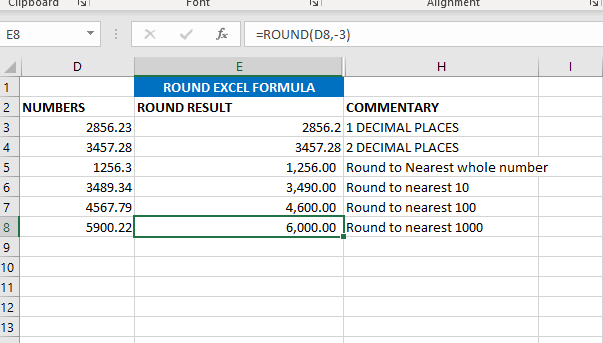
Here we are using ROUND Formula to round figures in excel. Round Formula ask for 2 arguments. 1 is number and num digits.
If we want to round in 1 decimal the formula is =ROUND(D3,1).
If we want to round in 2 decimal the formula is =ROUND(D4,2)
If we want to round nearest to whole number formula is =E5=ROUND(D4,2)
If we want to round to nearest 10 the formula is=ROUND(D6,-1)
If we want to round to nearest 100 the formula is =ROUND(D7,-2)
If we want to round to nearest 1000 the formula is =ROUND(D8,-3).
As shown in below image
EXAMPLE 2 :-ROUNDUP
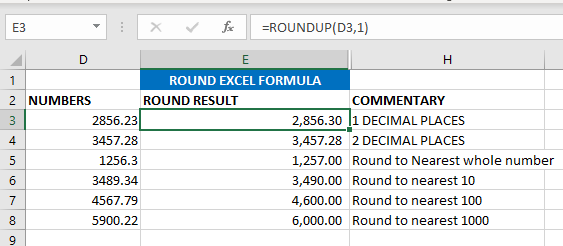
Now we will learn ROUNDUP excel formula. ROUNDUP always roundoff the number to next number. In ROUND we are rounding the value to below numbers or down number. Rest everything is same.
If we want to round in 1 decimal the formula is ==ROUNDUP(D3,1).
If we want to round in 2 decimal the formula is =ROUNDUP(D4,2)
If we want to round nearest to whole number formula is =ROUNDUP(D5,0)
If we want to round to nearest 10 the formula is=ROUNDUP(D6,-1)
If we want to round to nearest 100 the formula is =ROUND(D7,-2)
If we want to round to nearest 1000 the formula is =ROUND(D8,-3)
As shown in below image