EXCEL TEXT FUNCTION
How to use Excel "TEXT" Function
TEXT function is used to change the formatting or appearances of the text. There are various types of formatting available and can be applied as per the requirement.
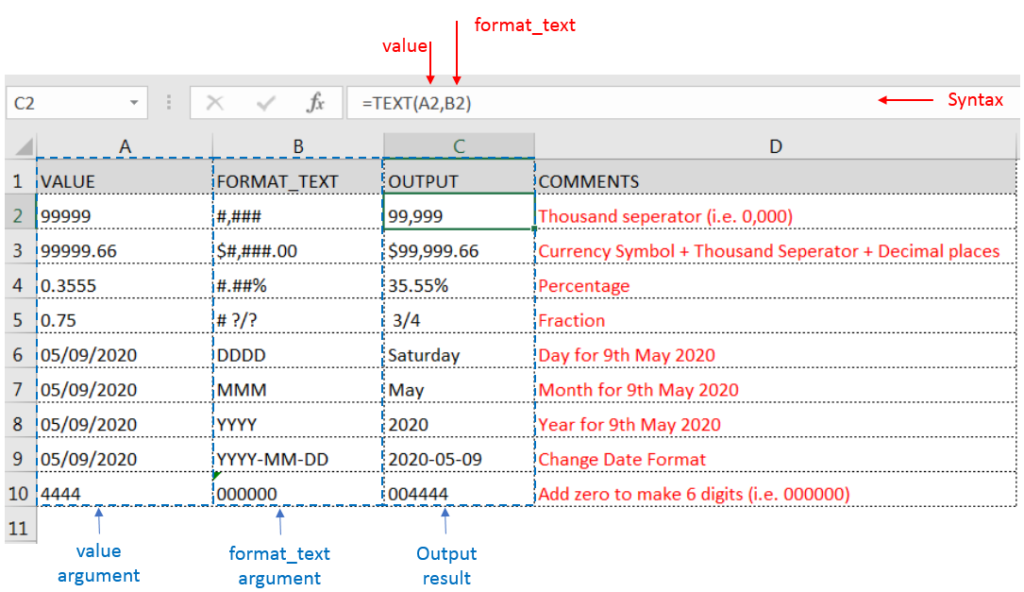
TEXT Function has two “Required” arguments i.e. value and format_text
Syntax: For Excel Text Function
=TEXT(value,format_text)
Syntax Description: Text Function
value argument [Required] is used to give the text or cell reference for which formatting is to be changed
format_text [Required], is used to give the formatting code as per the requirement
Example 1: Exploring Excel “TEXT” function with examples:
Here we have some examples, where “Column A” has various values, “Column B” represents format_text and “Column C” shows the output of the function.
We will be using TEXT function as follows:
Multiple Excel Text Functions
Things to Remember: Excel Text Function
– Format of cell can also be changed by following CTRL+1 (or MAC Command button +1) and select the desired format/appearance
– If cell reference is not correctly provided in the function, then it will give output as an error
– Function should give output in “General” format, however if output is not as per the desired format then we need to change the cell format to “GENERAL”
Hope you learnt this Function,
Don’t forget to leave your valuable comments!
If you liked this article and want to learn more similar tricks, please Subscribe us or follow us on Social Media by clicking below buttons: