VBA Code to Convert MM.DD.YYYY to DD-MMM-YYYY In Excel
VBA Code to Convert MM.DD.YYYY To DD.MMM.YYYY in Excel
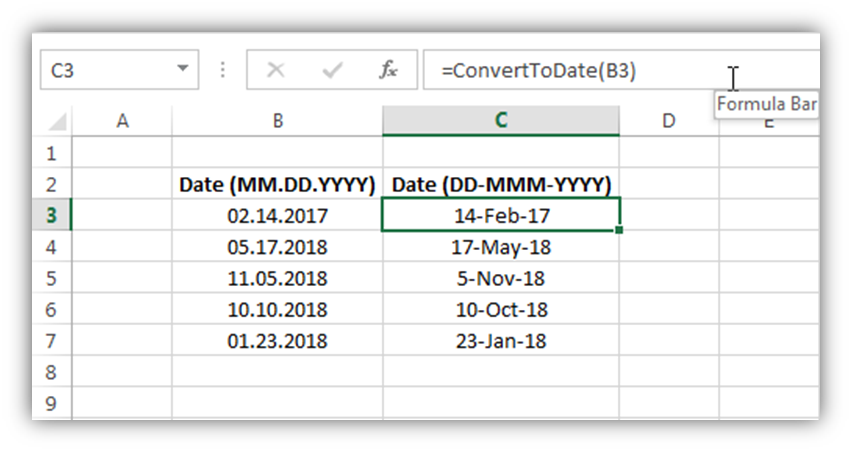
In different parts of the world, there are different languages spoken and written. With this, a VBA programmer also faces language related issues while writing a VBA program. Here is a common date related problem solved which converts a date written in MM.DD.YYYY format into Excel standard date.
VBA Code to Convert MM.DD.YYYY To DD.MMM.YYYY in Excel : CODE
'This function converts a date from MM.DD.YYYY to system date format
Public Function ConvertToDate(strInputDate As String) As Date
    'Variable Declaration
    Dim iMonth As Integer
    Dim iDay As Integer
    Dim lYear As Long
    '
    'Get month from first 2 digits
    If IsNumeric(Left(strInputDate, InStr(1, strInputDate, ".") - 1)) = True Then
        iMonth = Left(strInputDate, InStr(1, strInputDate, ".") - 1)
    Else
        ConvertToDate = Null
        Exit Function
    End If
    'Get day from input date
    If IsNumeric(Mid(strInputDate, InStr(1, strInputDate, ".") + 1, 2)) = True Then
        iDay = Mid(strInputDate, InStr(1, strInputDate, ".") + 1, 2)
    Else
        ConvertToDate = Null
        Exit Function
    End If
    'Get year from last 4 digits
    If IsNumeric(Right(strInputDate, 4)) = True Then
        lYear = Right(strInputDate, 4)
    Else
        ConvertToDate = Null
        Exit Function
    End If
    'Create a complete date and return the value
    ConvertToDate = CDate(iDay & "-" & MonthName(iMonth) & "-" & lYear)
    '
End Function
To Convert the Date Format use this code in your Excel file, follow the below steps
1. Open an Excel file
2. Press Alt+F11
3. Insert a Module (Insert>Module) from menu bar
4. Paste the code in the module
5. Now write ConvertToDate formula in a cell and select the cell which contains a date in MM.DD.YYYY format
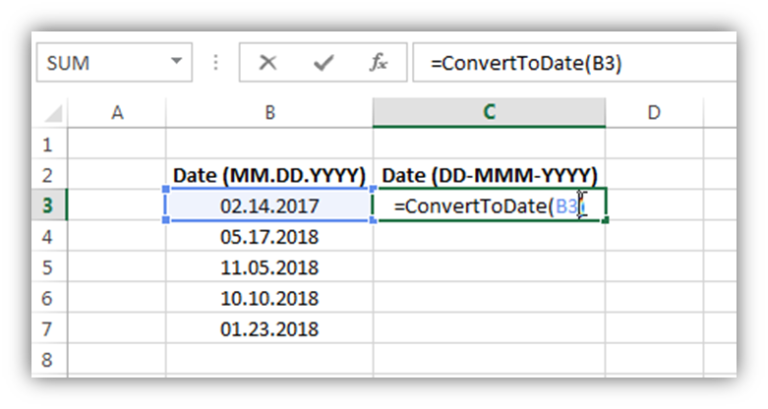
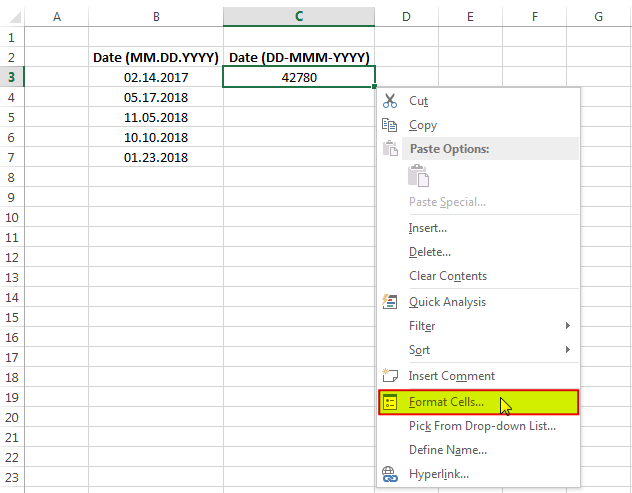
6. You may get the converted date in number format like below
7. To change the date format into the desired format, right-click on the cell and select ‘Format Cells…’
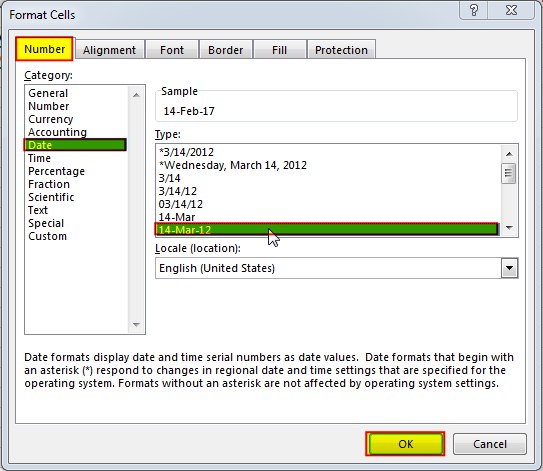
8. In the ‘Number’ tab, click on ‘Date’ category and select the format type you want to display (here I have selected DD-MMM-YYYY format)
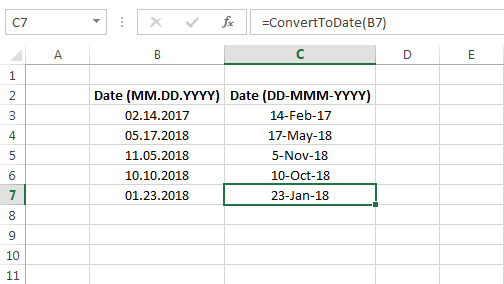
9. Done, your date is converted. You can drag the formula to other cells as well
Download Practice File for Free
To help you practice this code, we have made this code available through practice file. Click on the below link to download the practice file.